Unhappy Paths
A field guide to the edge cases interfaces meet in the real world. Each issue reproduces one in your own browser, explains it from the specification, fixes it in production code and hands you the tests.
Open Unhappy Paths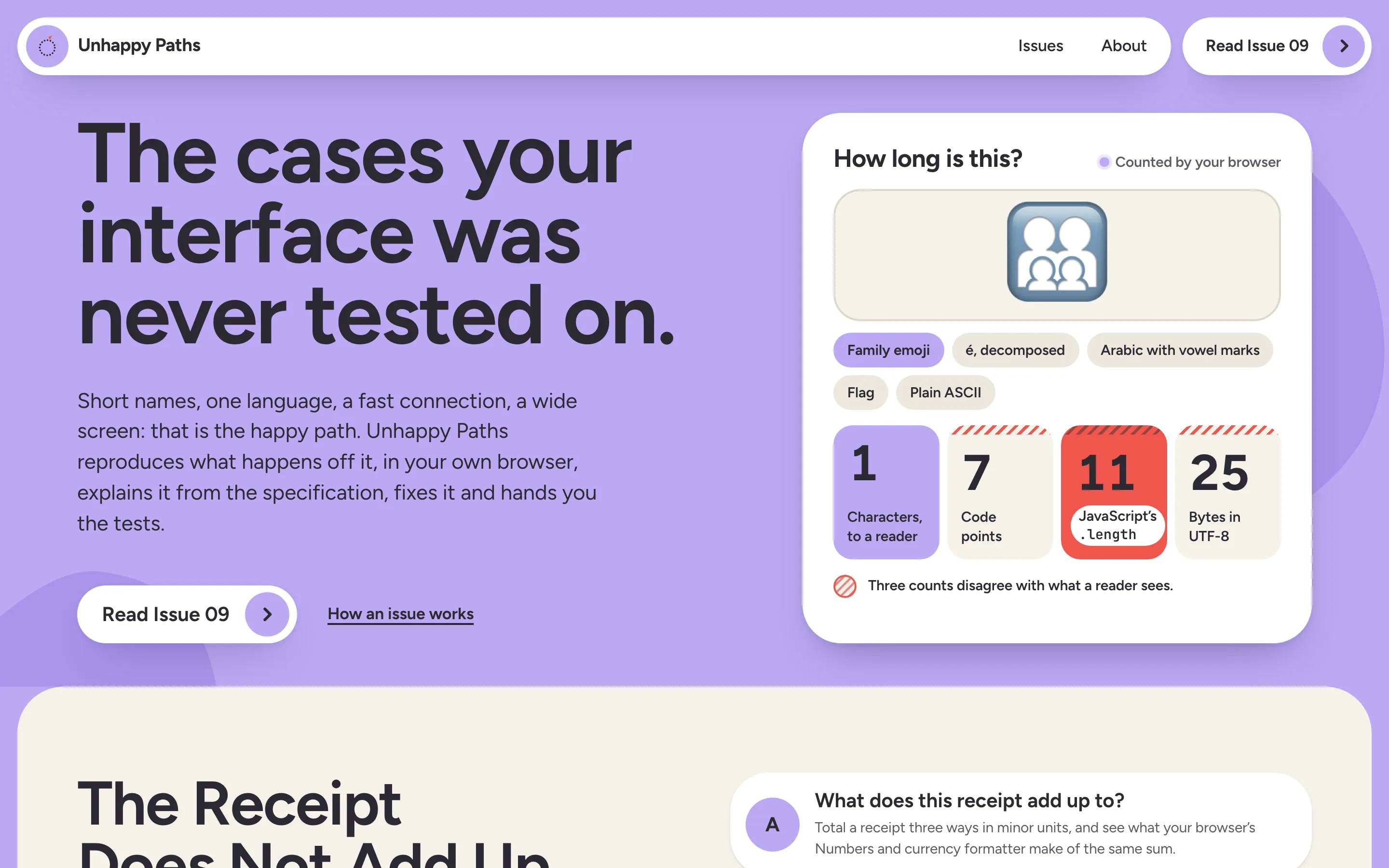
In one line
A field guide to the edge cases interfaces meet in the real world. Each issue reproduces one in your own browser, explains it from the specification, fixes it in production code and hands you the tests.
The brief (to myself)
Interfaces are designed and reviewed on the happy path: short names, one language, a fast connection, a wide screen. The failures that reach real people happen elsewhere. A phone number reverses inside an Arabic sentence. A character counter disagrees with the person typing. A meeting is booked at a time that doesn’t exist.
These problems are well specified in standards and poorly explained almost everywhere else, so teams rediscover them one bug report at a time. I wanted the explanation I’d have wanted myself: calm to read, traced to the actual rule, and with a live experiment that shows what your browser really does.
The constraint I set: no claim without a source, no published code that doesn’t run, and nothing you type leaves your browser.
What it does
- Nine issues, one territory each: text and direction, time and dates, the mobile viewport, keyboard input, what a screen reader hears, content that refuses its box, font and form-control rendering, slow and offline networks, and money and numbers. About 31,000 words in all.
- Every issue has the same four stages: Reproduce, Understand, Fix, Test. Then Limits, Sources and Related, so you always know where to look.
- 27 live plates, three per issue. Each one runs in your browser on its real engines. For example:
- a grapheme inspector that counts any text four ways;
- a bidi playground comparing
dir,dir="auto"and<bdi>; - viewport readouts that move as you resize or zoom;
- an event log that shows composition as you type;
- a request that is neither finished nor failed, with a deadline, cancel and one retry;
- one amount as seven locales write it, read back by
Number,parseFloatand your own number field.
- 189 test fixtures with expected results, as tables on the page and as nine JSON files you can fetch, all listed on one page, plus a checklist, an example unit test and an example Playwright test in every issue.
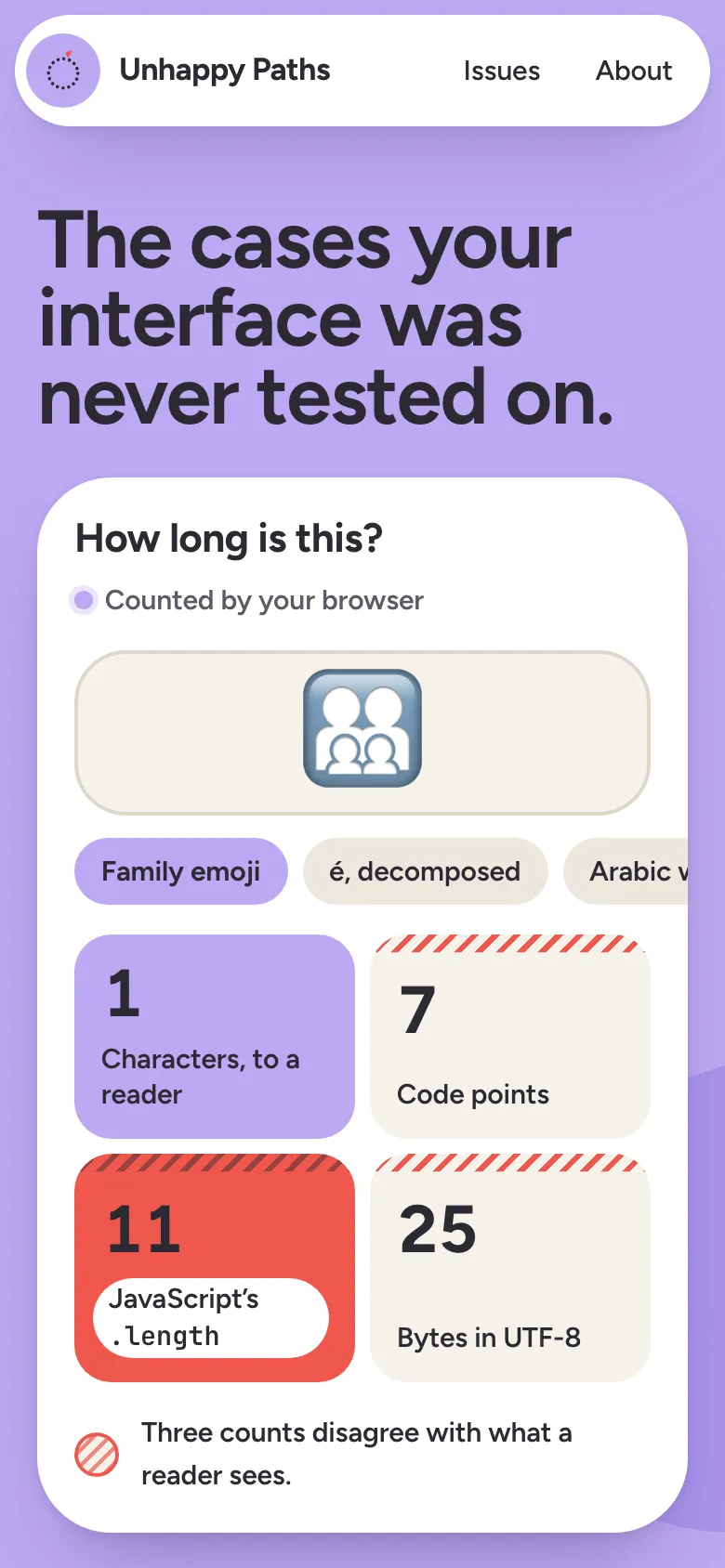
- A home page that proves the point in the first viewport. A live counter shows the family emoji as 1 character to a reader, 7 code points, 11 for JavaScript’s
.lengthand 25 bytes. Type your own text and it recounts.
Key decisions and trade-offs
- Real behaviour before simulations. Plates use the browser’s own
Intl.Segmenter, bidi rendering,visualViewport, composition events and layout. Where the platform has no API, the plate models the algorithm and says so on screen. The accessible-name model was checked against Chromium’s own accessibility tree for all 48 switch combinations and 21 fixtures. - Every claim traced to a primary source. 121 sources across nine issues: Unicode annexes, WHATWG, CSSWG, ECMA-402, WAI-ARIA, RFC 9110. Each issue names the browser and version its notes were checked against. When numbers measured in an older Chromium changed in Chrome for Testing 156, they were measured again, not carried over.
- Published code is tested code. Every sample lives in a TypeScript module that a unit test runs. Every published fix has a test that fails without it. The published Playwright tests run unchanged in a real Playwright project.
- Opinionated about defaults. For example, one retry everywhere, because RFC 9110 says a client SHOULD NOT retry a failed automatic retry. And money stored at a scale you choose, because the engine’s default digits are implementation-defined: Chrome 156 formats RSD with 0 decimals while ISO 4217 says 2.
- Every kilobyte is counted. The home page carries under 2 KB of JavaScript gzipped. The heaviest issue page carries 18.1 KB, inline scripts included. The 155 KB Unicode names file (33 KB gzipped) is fetched only when the inspector needs a name.
- Works without JavaScript. Every plate renders its default state at build time, with a notice saying what needs scripts.
- Static and private. No accounts, cookies, comments or backend. Fonts are self-hosted, and nothing you type is sent anywhere.
- Honest limits in the text. Each issue has a Limits section. When the default behaviour is fine (ordinary mixed Arabic and English text, for one), the issue says so instead of manufacturing a problem.
Design
- The first look was cream paper, a serif and uppercase mono.
- The second was a calm, Apple-like reading page. It read as generic, it buried the plates, and it sat too close to my own portfolio.
- The third is a bolder world of floating capsules. White slabs and cream reading panels sit on a coloured field. Tomato, cobalt and yellow appear only as discs. The type is Figtree and JetBrains Mono, with IBM Plex Sans Arabic for Arabic. The live counter shares the first viewport with the headline, on phones too.
- Colour. The field was green first. I compared three colour-only variants on the same layout (mist, lilac, marigold) and locked it to lilac.
- Light only, on purpose. The field is the identity, so there is no dark theme. A unit test checks every text and background pair in the design tokens for contrast.
- A finish review returned eight fixes, then passed after two verdict rounds.
- A wayfinding pass after nine issues:
- The header gets a reading bar with the current section and progress. It opens a contents panel grouped by stage.
- Issues get previous and next links.
- Long code folds.
- The archive shows each issue’s live cover. Title and cover morph from the archive into the issue with cross-document view transitions.
- A UI and accessibility audit after that, at desktop and phone widths, by keyboard, with axe and with bad input in every field. It found 15 problems, among them:
- The home counter read all four numbers aloud on every keystroke. It now says one sentence once typing stops.
- All 33 callouts were landmarks, so a screen reader’s landmark list was mostly callouts. They are notes now.
- Links outside the article text were told apart by colour alone. They are underlined.
- The sample chips on the home counter didn’t show which sample was loaded.
- The header was 4 px too wide for a 320 px phone. The test for it was already failing, and nobody had noticed.
- The home page and About said plates never model behaviour in JavaScript. Three issues do, and say so on screen, so the copy now says that instead.
Process
- Research first. Every issue starts from the specification sections it will cite, read in full, with MDN and browser-compat-data used only for support status. The outline (lede, parts, plates, fix, fixtures, limits) is written down before any code.
- Built side by side. Before the issues started, I moved every file that each issue would touch into per-issue files: covers, fixture registration, the end-to-end site checks and the OG image script. That let several issues be built in parallel, each merging through its own pull request without conflicts.
- The gates for every issue:
- type checks;
- unit tests (812 now);
- a production build;
- end-to-end tests (349 now), run three times over to catch flakes;
- the JavaScript weight.
- A cold review per issue, up to three rounds. A reviewer who hadn’t seen the drafting read each issue against its sources and its code. Material findings were fixed and reviewed again. Issue 04 went from 10 findings to 1 to 2. Issue 09 went from 7 to 1 to 0.
Bugs worth telling
- Analytics on a site that promises none. Cloudflare’s edge added its Web Analytics script to every page after the page left the build, so no check of the build could see it. Only a check of the live site did. A
Cache-Control: no-transformheader now stops the edge from changing the page. - A phone page zoomed out to 555 px. A visually hidden table header escaped its scroll container, so the page was wider than the phone and the browser zoomed the whole page out to fit. The usual overflow check can’t see this, because
innerWidthgrows with the zoom. The end-to-end suite now comparesinnerWidthwith the real viewport on every page. - A phone number split across two lines at a real device width, in the very order summary meant to show it surviving real data.
- A clean-up function stripped the zero width non-joiner that Persian names need. The issue on input was about to publish code that broke the names it was defending.
- Archive, undo, archive again could leave the screen and the server disagreeing. It took three passes. Every sequence of up to four presses is now tested against both inbox implementations.
- A font probe that was wrong on macOS. Measuring which font drew each character against monospace gave false answers, so the plate now measures against a blank font built in memory. It agrees with Chromium’s own font report for every fixture.
- Flaky tests that weren’t flaky. The bidi tests failed now and then under load. The trace showed a second document request mid-test: a browser’s bundled content blocker held each new tab’s requests, then reloaded it once its filter lists loaded. The suite now runs on Playwright’s own Chromium, which has no extensions. The run that had failed 6 of 240 then passed 240 of 240.
Cut from v1 (deliberately)
- No dark theme.
- No accounts, comments or newsletter, and no analytics.
- No translations yet. Issue 01 in Arabic is the obvious first.
- No downloadable fixture packs and no per-issue changelog of corrections.
- No real screen reader, input method or phone in the checks. The issues say which browser they were checked in (Chromium on macOS) and where others may differ.
What could come next
- Run Issue 05’s plates with VoiceOver and Issue 04’s with a real Japanese and Korean input method.
- Check every issue in Firefox and Safari and note the differences in each issue’s Limits section.
- Performance on low-end devices as a tenth territory.