Scope
Bring a fuzzy product idea. Leave with the smallest version worth building, the odds of making your date, and a one-page brief.
Open Scope
In one line
Bring a fuzzy product idea; leave with the smallest version worth building, the odds of making your date, and a one-page brief. It’s a product engineer’s first call, as a tool.
The brief
Show the judgment behind good product work (deciding what to build, cutting it down, and knowing how you’ll tell it worked) as something a person with an idea can use, not something they read about.
What it does
-
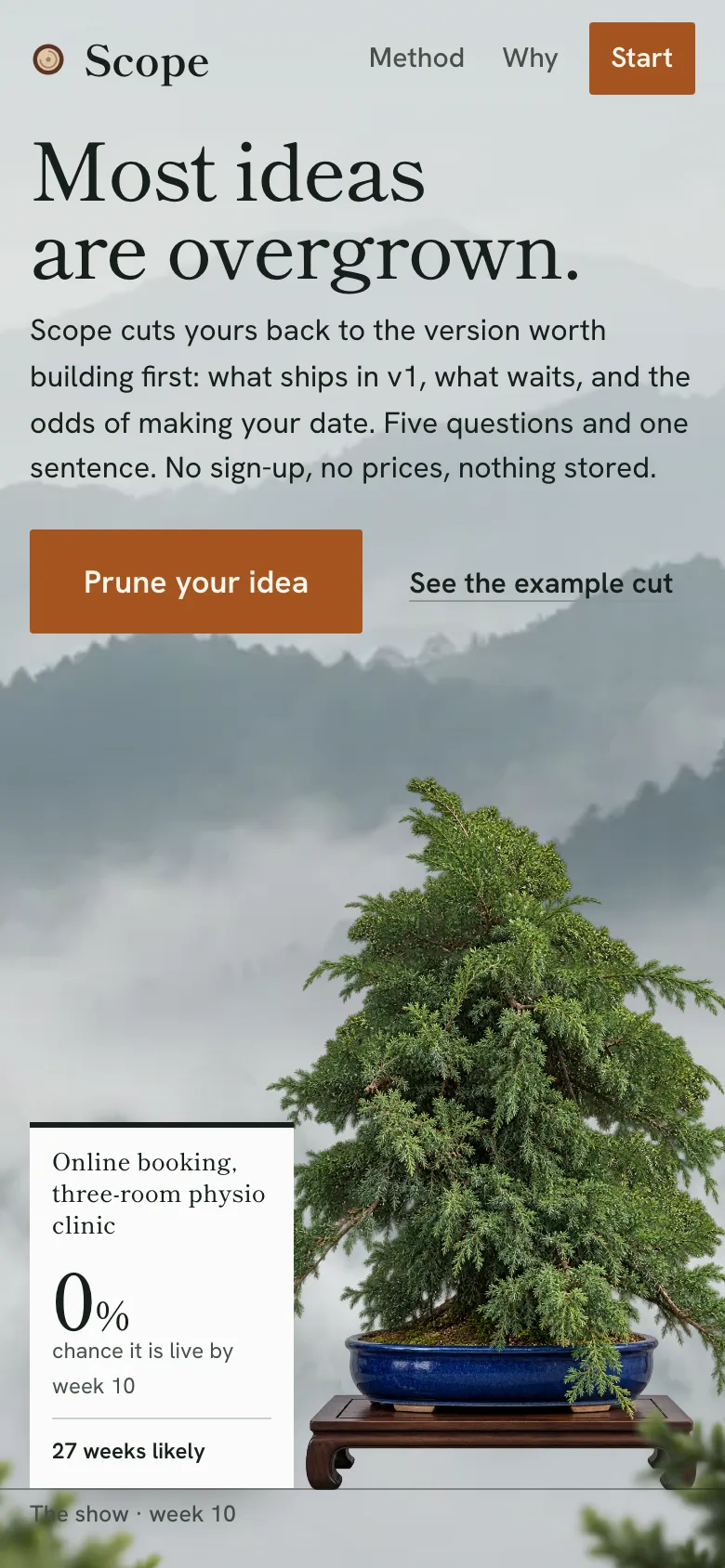
A landing page that does the cut in front of you. Scroll, and a real overgrown juniper is pruned branch by branch while the example’s nine cuts strike off one at a time. The odds on its exhibition label climb from 0% to 70%.
-
Five questions and one sentence, one per screen: what kind of product, what it does, how it makes money, what happens today, where people use it, and whether there’s a date. The wishlist grows beside each answer, the way a first message to a developer reads. It runs from the keyboard alone, and Back steps through it.
-
The idea as a ledger. Every feature a client would usually ask for starts in v1. Each piece shows its range on one shared scale (long and wide reads as big and uncertain) and a three-way switch: v1, later, not doing.
-
Pushback with an alternative. Scope questions the pieces v1 can live without:
- “Do people need passwords on day one?” Swap for sign-in by email link.
- “Could you pay sellers by hand each week at first?” Swap for manual payouts.
One click applies the whole cut, or you go through it piece by piece and keep what you want.
-
The estimate as odds. A simulation over every piece’s range gives a likely figure, a safe-to-promise figure, and the chance of going live by your date. Move a piece and the curve redraws on the date’s horizon line, with the old figure struck through beside the new one.
-
The brief. v1, later, not doing, what to test before building, the one number that says it worked, and the questions to ask on a first call. Print it, copy it as Markdown, or share the link.
Key decisions and trade-offs
- No prices, ever. Day rates vary too much for a price to mean anything, and a price on a free tool is a sales trick. Estimates are working weeks for one experienced developer, shown as ranges.
- Ranges with odds, not a number. It’s a Monte Carlo simulation over three-point estimates, plus one shared “project factor” per run. Real overruns are correlated, and without that factor big plans look falsely certain. Odds are rounded to 5% and weeks are rounded up.
- Cutting narrows, not just shortens. The design is built around that insight. In the example clinic’s plan, the wishlist is likely 27 weeks with a 0% chance of a 10-week date. Scope’s cut brings it to 9 weeks and 70%.
- Opinion over a model. The pushback rules are written down, consistent and explained on
/method. A chat assistant agrees with every feature; the value here is the “not yet”. - Each piece has its own random stream. Moving one piece changes only its share of each run, so the difference on screen is the piece, not noise. The same plan gives the same numbers in every browser.
- The URL is the plan. No database and no accounts. Nothing is stored about anyone, and every plan is a link.
- Measured from day one.
- Typed events for each step from start to brief, with no cookies.
- The north star is the share of plans that end with a brief taken away; the guardrail is time to brief.
- Scope’s own v1 / later / never list is published on its about page.
Design
The first build was a dressmaker’s pattern sheet. It worked, but it looked like every generated app: radio cards, a form as the homepage, yellow badges. The redesign (2026-10-23) replaced it with the pruned tree: an idea arrives overgrown, and Scope cuts it back to the tree that lives, in time for the show (your date).
- One juniper, three states. Eight images generated in ChatGPT from written prompts (
art/PROMPTS.md). The three pruning stages were registered to each other by the stand, so a crossfade reads as pruning. - Parallax with a job. Mist ridges, a drifting mist band, the tree and blurred foreground sprigs each move at their own depth while the scene is pinned. The motion is driven by one scroll loop writing CSS variables, so only the cut count is React state. With reduced motion, the whole cut is shown at once.
- Colour with rules. Cool mist grounds and juniper-black ink. The pot’s cobalt glaze is the one field colour (the estimate card, the “asks for nothing” band). Copper appears only on things you can press.
- The exhibition label carries the estimate everywhere: odds as the largest figure, the old figure struck beside the new.
- One horizon line, the show date, runs under the tree, the estimate band and the closing scene.
- The sealed cut, the face of a branch cut and painted over, marks everything in “not doing”, on every page.
- Shippori Mincho B1 for display and figures (its brush-cut serifs come from Japanese exhibition typesetting); Hanken Grotesk for the working UI.
An audit after launch
Three weeks after the redesign, I audited Scope the way a stranger would use it. I tried it at laptop and phone sizes, keyboard only, under reduced motion, with axe, in print, and with bad input: commas, halves, huge numbers, letters, repeated names, long sentences, broken links. axe was clean and every switch read clearly on and off. The problems were in typing, focus and the brief. Fifteen of them; the ones that mattered:
- The date couldn’t be typed. The week field corrected itself on every keystroke, so typing “12” gave 22, “1” gave 2 and “3,5” gave 35. In the interview, “3.5” removed the date altogether. A whole number now applies as you type it; a half, a comma or a number out of range waits for Enter or for you to leave the field, then rounds and clamps.
- Moving a piece from the keyboard lost your place. The arrow keys on a piece’s v1 / later / not doing switch moved it to another list and dropped focus to the top of the page. Focus now follows the piece. The same happens after a swap, applying the whole cut, undo and removing a piece.
- A plan without a sentence wore someone else’s idea. Skip the sentence and the plan and its brief were headed “A tool small accountancies use to chase missing client documents”, the placeholder, with nothing marking it as an example. The heading is now the kind of product, and the plan offers “Add a sentence”.
- The printed brief had no way back to its plan. Its footer said the plan “opens from the link it was shared with”, but paper has no link. The printed brief now carries the plan’s address.
- A screen reader heard the odds count up. The figure animates, and it sat in a live region, so one change made 21 announcements. The animation is for the eye now; assistive tech hears the result once.
- A date, once set, couldn’t be removed from the plan. The card now has “No fixed date”.
- On phones the estimate card shows first but came last in the keyboard order, about 30 Tab presses in. It is now first in both.
- The same custom piece could be added twice, and the two shared one random stream, so the estimate treated them as one risk counted double.
- “Start over” threw away every answer. It is now “Change the answers”, and they come with you.
- A sentence over 160 characters in a link was dropped whole; it is now trimmed. A line break in it broke the Markdown heading; it is now one line.
- v1’s header said “87 days of pieces” beside “Likely 27 weeks”. Both were right (the weeks add set-up, testing and slippage), but together they read as a contradiction. The header now counts pieces, and the estimate lives on the card.
- A link that had lost the product itself opened an empty v1 saying there was nothing left to push back on. The product is never cut, so it now comes back.
Stack
TanStack Start on Cloudflare Workers. A pure TypeScript engine with unit tests. Zod-validated URL state. Workers Analytics Engine for product events.
What’s next
- Watch five founders use it with their own ideas: that’s the riskiest assumption.
- Describe the idea in your own words and have the questions filled in.
- Plans for a team of more than one developer.